A Browser-Based Information Sandbox Built on Top of Existing Standardized Web Specifications
Abstract
Modern day web browsers are arguably the most popular virtualization environment ever engineered. They are so good that users do not even think about potentially getting a virus when ordinarily browsing the web. They are so so good at virtualization that modern day browsers have nearly all of the requisite parts to create an information sandbox; i.e. a sandbox that will prevent non consensual data exfiltration by a byzantine application and will ensure that any previously accessible data entrusted to the application will never suddenly become inaccessible to the end user.
Such an information sandbox would readily support the local-first movement’s ideals [1] that encourage application developers to develop apps in such a way that they continue working even offline and that keep users in control over their data; all without sacrificing cloud-like conveniences such as realtime collaboration and cross-device syncing.
A prototype of the sandbox is available at github.com/zphrs/tauri-sandbox.
Motivation
The average user generally feels comfortable visiting previously unvisited websites worry-free thanks to the impressive security features of the modern web browser. At the same time, many users are skeptical about entering information into an unknown website due to the risk that any data entered or drafted on the website can be exfiltrated.
Up until now most browser security features have been focused on ensuring that the user’s information is only able to be sent to the correct server, the origin’s host. Such features include HTTPS, Content-Security Policies (CSP), site isolation, the iframe sandbox attribute, the same-origin policy and cross-origin resource sharing (CORS). However, these security mechanisms assume that there is such a thing as a “correct server” to send data to.
For tasks such as writing, drawing, sending direct messages, and other acts of creation and collaboration, there is no such thing as a host server that can guarantee 100% confidentiality. Additionally, there is no server that can guarantee that they will not delete or restrict access to your data, especially not for all of time.
Overall there is a privacy-based justification for adding additional sandboxing on top of the browser, building on top of standardized web specifications originally intended to ensure that data only flowed to an origin server, to create an “information sandbox” that ensures that ultimately the user, not the origin’s host, has full control over their own data.
Generally, users of applications have no technological guarantees that an application will not send their data off device and that an application will never revoke their access to their own data. This is especially true on the web, which was built around trusting the owner of the site’s domain above all else. This means that typically the owner of the domain that the web application is hosted on has the full ability to do whatever they would like with their users’ data. This holds especially true for Web 2.0 applications like Google Drive, Figma, BetterHelp, and Notion who use liberal privacy policies that allow application providers to use user data in all sorts of invisible ways that end users are ultimately uncomfortable with [2] such as training AI, personalizing ads, and handing their data over to the government [3], [4], [5], [6], [7], [8]. At the same time, users ultimately feel helpless to do anything about tech companies who use their data in ways that make them feel uncomfortable. According to a survey of about 5,000 Americans conducted in 2023 by Pew Research, 73% of respondents felt that they had “little to no control over the data that companies collect about them” and 71% “are concerned about how companies use the data they collect about them” [2]. I posit that if people had affordable, easy-to-use, and feature-parity alternatives to the aforementioned applications, such as local-first applications that treat user data as strictly confidential by default, most concerned users would likely switch.
In addition to existing applications that leak user-data to private servers by design, such as Google’s products, recently there have been an increasing number of “vibe coders” who put blind faith into AI-generated code by having the AI do all of the actual coding while they advise from afar. As more people with little to no programming experience begin to create applications with little understanding of the code powering their apps, the risk of AI-generated code accidentally leaking or deleting user data dramatically increases. To address this, AI-generated applications should be constrained by an information sandbox to ensure that even if the AI-generated code behaves with flippant disregard of user data, the information sandbox will ensure that user data does not leak out of the sandbox and will ensure that the user is still able to ultimately access previously written data.
Local-First Movement
The local-first movement suggests an alternative paradigm to application development that puts the user back in control over their data without sacrificing the realtime collaboration features enabled by the cloud-first model of the web.
Kleppmann et al, in coining the term “local-first,” wrote a list of 7 ideals for local-first software [1]. This paper aims to enforce 5 out of the 7 ideals by placing applications in an “information sandbox.”
Ideals 1 and 3 both involve ensuring that an application does not rely on servers in order to work: Ideal 1 requires that the app works without needing to wait for a server to get back to it; relatedly, ideal 3 requires that the app does not rely on a network to function. Following these two ideals is encouraged by putting the user in the loop whenever an app tries to send or receive data off-device. While naturally some applications, like a weather app, might need network egress in order to send out a request to a weather API to fetch the forecast of wherever the user wants to get the forecast of; many applications, such as a word processor, do not. By informing users when an application sends data off-device they would, for instance, get suspicious of a local word processor that needs to send and receive data from the network in order to function.
Ideal 6 requires that the end user data is private by default, and ideal 7 requires that the user has ultimate control over who can access and modify the data that they have input into the application. Ideal 6 and 7 are directly enforced by the privacy sandbox as ultimately the sandbox gives the user total control over their data with network egress disabled by default.
In contrast to the previous four ideals, ideal 5 can only be addressed by restricting the application’s ability to make irreversible writes to disk in addition to making network egress opt-in. Ideal 5, which requires that the application continues to work so long as the user has a copy of the application and a device to run it on, is enforced by treating the application like a finite-state machine, i.e. an application whose inputs are fully controlled. So long as the input data from the user’s disk is the same and the user does not allow any network egress, the application will continue to function in the same manner it functioned whenever the user previously opened the application.
The remaining two points of the local-first movement not covered above – 2: “Your work is not trapped on one device” and 4: “seamless collaboration with your colleagues” – deal with interconnectivity between devices and thus are out of scope for a locally running sandbox [1]. That said, the sandbox does not outright prohibit any outside connectivity whatsoever; rather it only prohibits information flow that is not authorized by the sandbox host. So, if the user wishes to sync their data to their other devices or to their friends, then a sandbox host can permit a sandboxed application to do so, and as long as the sandbox host asks the user before granting permission, the other 5 ideals continue to be upheld by the sandbox.
Prior Work
There are a few other researchers and projects who have tried to implement similar exfiltration prevention mechanisms and have realized similar limitations of modern-day web browsers, including a paper from 2016, Delta Chat, and Peergos.
A paper from 2016 discovered one of the issues this thesis discusses when it comes to using a CSP to prevent data exfiltration in-browser: how dns-prefetch can be used for data exfiltration. However it fails to mention the more severe data exfiltration issue with WebRTC [9].
Throughout my research I also stumbled across two other projects which have attempted a similar feat: Delta Chat which aimed to bring embedded arbitrary web apps to their chat app [10], and Peergos who aimed to add custom apps to their end-to-end encrypted file system [11].
This thesis draws on Delta Chat’s work at creating admittedly hacky ways to restrict use of WebRTC when it comes to bundled electron applications, WKWebView iOS applications, and Chromium-based android applications [10]. However, Delta Chat does not have any way for an application to request to pull in external data that was not in its original bundle. While certainly secure, this results in less flexibility for app developers who wish to pull in external and/or dynamic resources.
Delta Chat also fails to add mechanisms to ensure that a malicious application does not wipe user data or mount a ransomware attack on the end user. Ultimately, Delta Chat is meant for low-stakes web apps like in-chat games. This means that there is no persistence aside from the fallible web storage APIs. Delta Chat web apps are encouraged to use the localStorage and IndexedDB Storage APIs built into the webview; both of which can be cleared unintentionally by the user at any time and that do not automatically sync between the end user’s multiple devices. Rather, cross-device syncs are sent through their “best-effort” sendUpdate API. This lack of control over storage means that a malicious Delta Chat web app is able mount a ransomware attack on the end user’s data entered into the app or fully wipe the end user’s data as ultimately the web app has total control over the end user’s data stores for that particular web application. This is not sufficient to ensure that the end user truly has full control over their data.
Peergos fairs slightly better on the data persistence front and in allowing custom web apps to pull in external data; however, it fails to address the webRTC vulnerability altogether, does not provide safeguards to ransomware attacks, and its data persistence API is somewhat clunky [11]. Lastly it fully trusts a “home server” to serve application assets and to ignore exfiltration attempts rather than having a truly trustless solution [12]. While the home server is runnable on the end user’s personal computer either through Docker or through a Java application to achieve a truly trustless solution [13], most users will not go through the effort of setting up their own home server; furthermore, the home server cannot run on mobile devices whatsoever [13].
For persistent storage, peergos exposes its own custom Create-Read-Update-Delete (CRUD) API [11]. Peergos’s CRUD API does provide transparency to the application about how it is ultimately creating, reading, updating, and deleting files from a “host server” and it gives the user more flexibility about opening the same folders and files with multiple different applications [11]. However, the CRUD API also requires custom support from the application developer in order to support Peergos’s custom API. Lastly, the Peergos API fails to create automatic granular backups of user data to prevent a custom application from mounting a ransomware attack or accidentally and irrecoverably deleting user data [12].
Aspirational High-Level Design
The information sandbox enforces the above ideals by introducing proxy scripts that sit in between the application code and the outside world. To ensure that all data entering and leaving the application flows through the proxy scripts, the sandbox relies on web specifications like sandboxed iframes and the Content-Security Policy to restrict the application’s capabilities (see Figure 1).
There are two main classes of proxy sitting between the sandboxed application and the outside world: those that sit between the application and the user’s hard drive and those that sit between the application and the network (see Figure 1). In the case of the user’s hard drive, the proxy enables automatic granular backups of the user’s data on every single write. In the case of the network, the proxy can require explicit permission from the user before sending traffic out. The network proxy also can keep track of per-document network egress so that the end user is able to see precisely how much of their data has leaked from each document to each individual external source. The three features mentioned above, and any other unlisted features enabled by enforcing that all data to the outside world flows through a proxy, are unimplemented as the sandbox solely aims to enforce that data must go through the proxy, not to actually specify the behavior of the proxies itself.
The sandbox also strives to minimize the porting effort necessary to get any existing local-first web application up and running within the sandbox. To achieve this, the sandbox does not impose any new APIs onto the app developer; rather it overrides the behavior of existing standardized browser APIs like localStorage, IndexedDB, fetch, XMLHttpRequest, Origin Private File System (OPFS), WebSockets, and even the humble src HTML attribute to encourage sending all storage and network access through the sandbox’s proxies. While overriding the existing standardized browser APIs is not effective at limiting disk access and network use for actively malicious applications straining against the sandbox’s constraints1, most naively cooperative applications will happily and automatically use the overridden version just as easily as the native version.
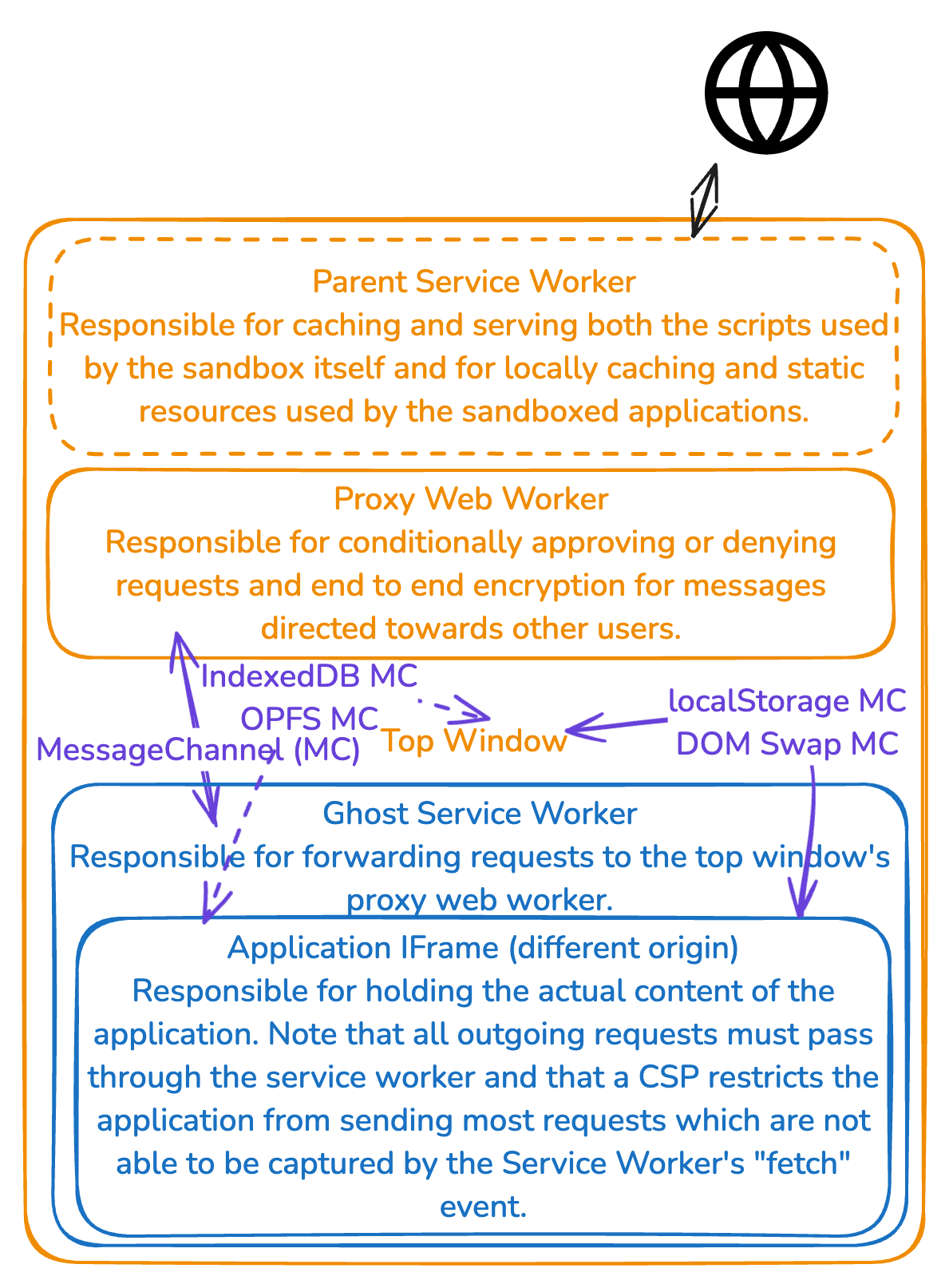 Figure 1: Aspirational High-Level Design
Threat Model Grounded in Reality
Ultimately, before beginning on the nitty gritty details of the sandbox, it is necessary to first identify the in-scope attack vectors with a threat model. My ideal threat model only assumes that the end user will act in their own best interests when faced with prompts asking whether they wish to share their data. In an ideal world the threat model would permit even a remote sandbox host to act maliciously.
Unfortunately, there are a few key limitations that means ultimately the sandbox host must be trusted (See red lines in Figure 2). While all of the limitations of the information sandbox are theoretically possible to address in-browser with significant additions to various web specifications and implementation work in the major web browsers, adding any one of those features could take several years. Additionally, these limitations of trusting the origin can be fully mitigated by bundling the sandbox host into a standalone application with Electron or Tauri, which allows a user to run their sandbox host on their own machine for users who cannot justify trust in a remote sandbox host (see Figure 3).
The threat model also treats the sandbox implementation and any related infrastructural components such as the underlying browser engine as the trusted code base. This assumption can be reinforced through code audits, precise versioning of the OS-level application, application signing, and allowing end users to build from source.
There is currently one incredibly glaring hole in the Content-Security Policy (CSP) that allows a sandboxed application to open arbitrary WebRTC connections, creating a cross-origin exfiltration vector such that any sandboxed application is able to talk to any host. This is addressed in the drafted level 3 of the CSP specification by adding a webrtc rule to the CSP spec. Because it is officially specified I assume that the webrtc rule will make it into browsers within the next year or two and so I am not too concerned about this issue long-term. In the short term, until the webrtc CSP rule lands in browsers, especially concerned users can disable WebRTC manually in their own browser whenever they are using the sandbox in-browser. Alternatively, similar to the proposed mitigation of the aforementioned limitations, a concerned user can simply use a local OS-level application as an OS-level application has the capability to disable WebRTC for its own embedded webviews, as shown in the Delta Chat WebRTC mitigation mentioned in the Prior Work section above [10]. 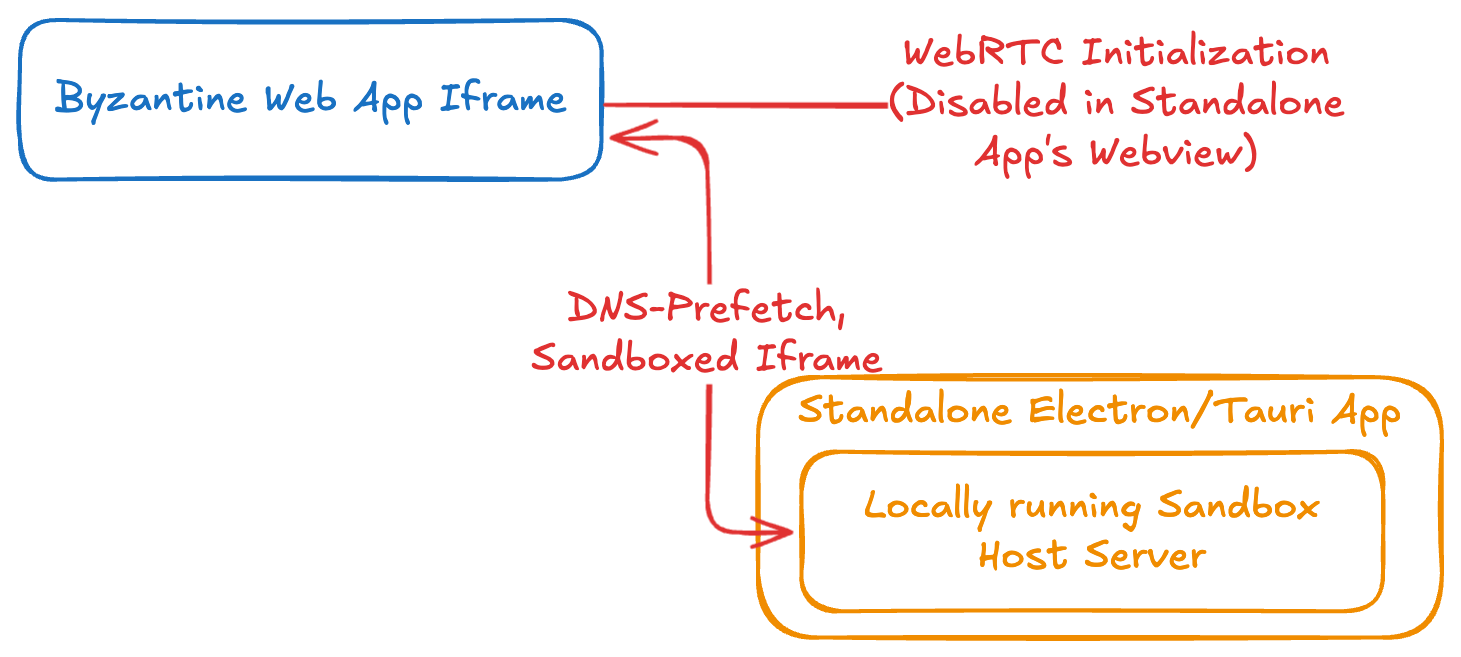
Figure 2: Data Exfiltration Channels from the Top Window
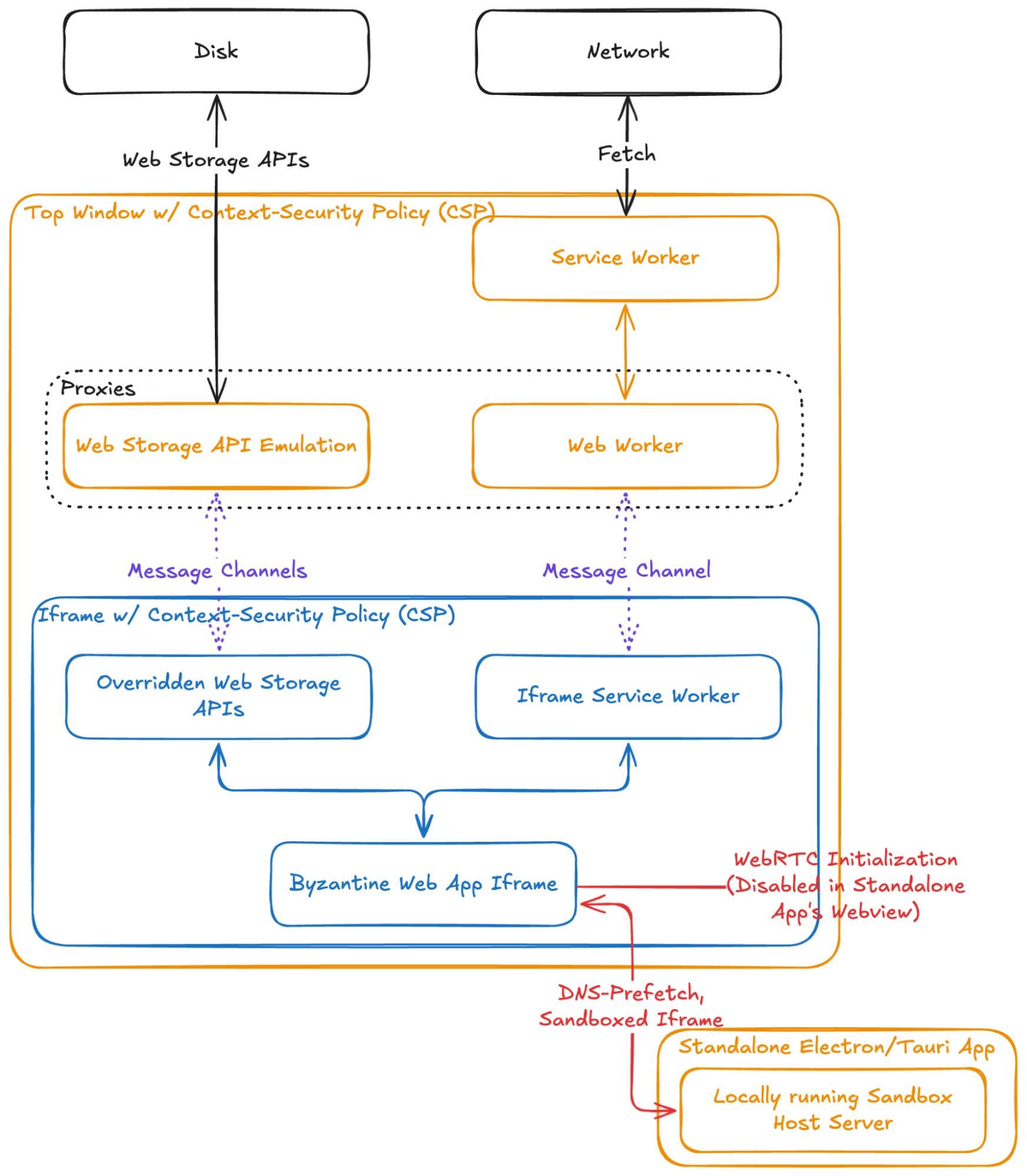
Figure 3: Possible mitigation options for data exfiltration via a standalone application
Utilized Web Specifications
The information sandbox combines a few major web features in order to enforce that all application data flows through the sandbox’s proxies: sandboxed iframes, service workers (SW), and the Content-Security Policy (CSP). All three involve facilitating, transforming, and/or restricting information flow.
The iframe HTML element allows a website (e.g. the top window) to embed another website within itself (i.e. the iframed window). This is often used to embed a map, a tweet, or an advertisement into another website. Importantly, the browser’s same-origin policy ensures that the information contained within the top window cannot be accessed by an iframed window of a different origin and vice versa, at least not without opt-in from the side providing information. This opt-in can be provided through the postMessage() api that allows either window to post arbitrary messages to the other window. This will be useful later on to proxy information from the sandboxed application up to the top window using RPC calls. That said, by default iframes have a lot of powerful capabilities that would allow data exfiltration such as making fetch requests, opening popups to other origins, navigating to different pages, and redirecting the parent frame.
To address the above exfiltration vectors of the default iframe, the sandbox attribute can be used to mostly lock down the iframe’s feature set. Specifically, the sandbox attribute is a whitelist-based set of rules applied to an iframe. The default ruleset includes restricting the iframed content from initiating downloads, submitting forms, opening modals (e.g. through a call to alert()), locking screen orientation, locking the user’s pointer, opening new tabs and popups (ex. links with target=”_blank” or calls to window.open()), accessing same-origin resources like cookies and other data storage mechanisms by giving it an “opaque origin” that will never pass a same origin check, running javascript, and navigating the top window. Specifically, the sandbox attribute prevents data exfiltration through an application either opening a popup window or by navigating the top window as any attempt to do so will be blocked by the sandbox attribute. While most of the rest of the default restrictions are also useful for overall user experience – even if not crucial to the information sandbox – we do want to enable running javascript as almost all web applications rely on javascript in some way. We also want to enable access to same-origin resources as that will allow the iframe to register a service worker, the next technology the sandbox relies on.
Service workers act as a convenient network proxy for a website and, to fulfill their intended purpose of being an incredibly flexible caching layer, have access to many storage APIs. Specifically, for the information sandbox, service workers are useful because they intercept almost every type of remote request a website can make. Then, the service worker can modify the request, discard the outgoing request entirely, reply back to the sandboxed application immediately with locally stored files and information, and modify responses from an external source before they hit the actual application code. This functionality is what enables us to have incredibly fine-grained permissions over web requests made by the byzantine application. The best part is that once a specific service worker has been installed it cannot be uninstalled until a page reload so the untrusted application is unable to uninstall the proxy or replace it with a proxy that is more permissive.
That said, the service worker has some limitations: mainly an inability to block iframe requests when the iframe is of a different origin. Since a parent window can send information into a child iframe and vice versa, if the child iframe is able to create an iframe of a different origin than the parent frame then that grandchild iframe would be able to exfiltrate content on behalf of the sandboxed application. That’s where the Content-Security Policy comes in, which restricts the application from creating any iframes with a different origin from the parent iframe, among other things.
The Content-Security Policy – if specified either through the Content-Security-Policy header or through a meta element such as <meta http-equiv="Content-Security-Policy" content="Policy"> – will act as a whitelist of resources the webpage can access. Resources can be specified in many ways including based on origin such as https://example.com, content hash such as sha256-cd9827ad..., or protocol such as https: or ws:. Specifically, due to limitations of the service worker discussed above, the child iframe’s CSP restricts any iframes that load in content externally. Additionally, for reasons further discussed in the Network Proxy: Limitations section below, the CSP also blocks all network requests not directed towards the iframe window’s origin.
Limiting the Application’s Control Over User Data
The sandboxed application should be limited in two ways: firstly it should not be able to make previously accessible user-generated information inaccessible. This forces adherence to ideals 3 and 5. Secondly it should not be able to send user-generated information out onto the web at large without user permission. This, in combination with the first restriction, encourages adherence to ideal 12 and forces adherence3 to ideals 6 and 7.
Architectural Overview
To fully control information flow between the application to both the network and to persistent storage, the information sandbox consists of two frames, each with various side processes that facilitate the functionality and security of the sandbox. The first of the two frames – the top window of the webpage – contains two side processes: a service worker responsible for caching both the sandbox’s assets plus the assets of the untrusted applications and a web worker responsible for proxying requests originating from the active untrusted application. The top window also spawns the second requisite frame – the child iframe – that is responsible for running the untrusted application. The child iframe itself has its own service worker that forwards most request types that a web application can make up to the parent frame’s web worker. See Figure 4 for a complete diagram of the architecture.
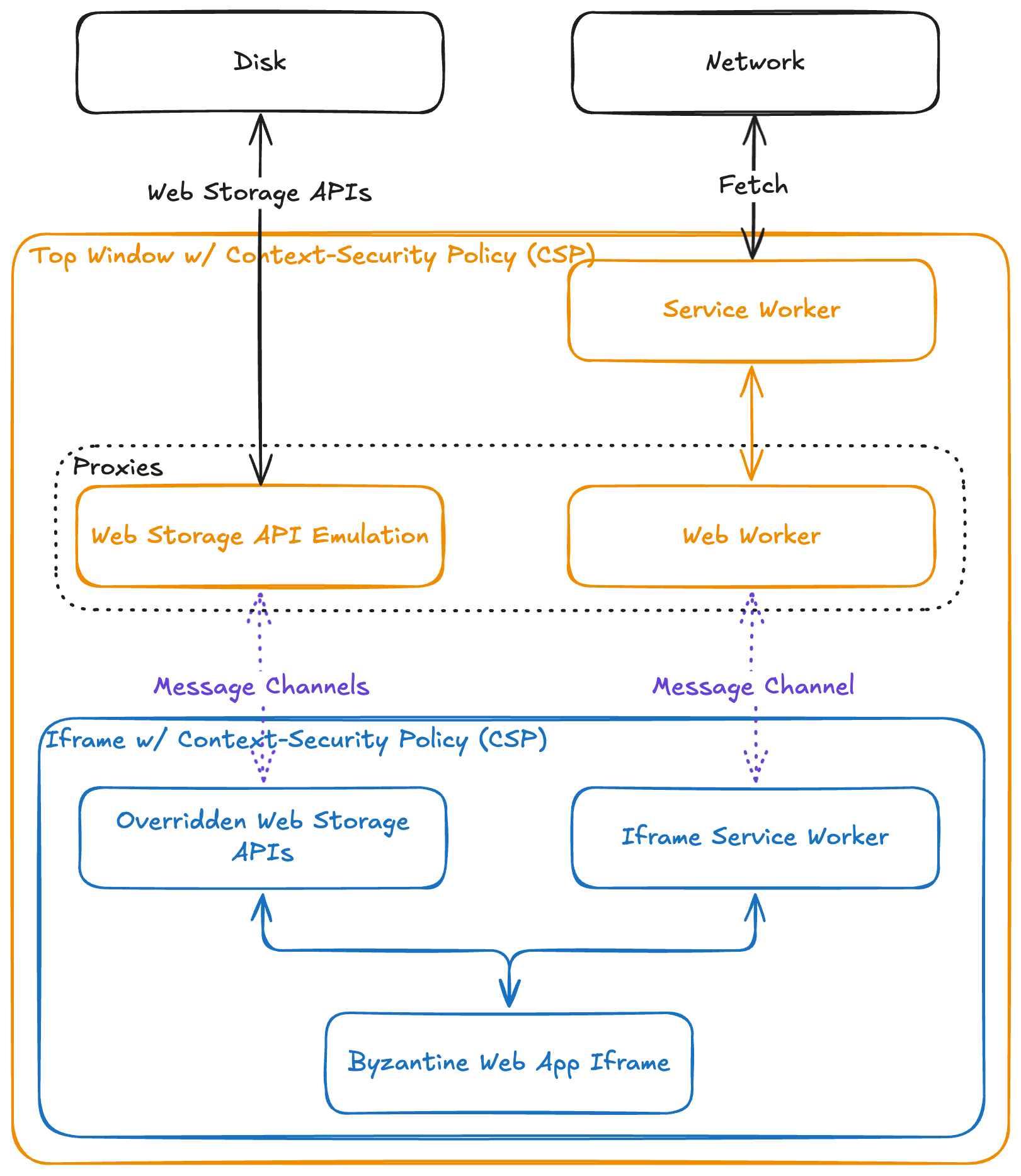 Figure 4: 4 A visual nested representation of the various processes within the sandbox. Dotted lines outline functionality that while planned, are not currently supported in the prototype.
Network Proxy
The network proxy automatically intercepts the vast majority of requests made by the child application, with notable exceptions being cross-origin iframes, the prefetch class of requests, and webRTC channels. Save for those exceptions discussed in greater detail below, all other requests are picked up by the “Ghost Service Worker” that is the child iframe’s service worker. Then the Ghost Service Worker sends messages to the Proxy Web Worker through a dedicated Message Channel. This way the Proxy Web worker is solely responsible for making decisions about whether to continue forwarding the request to the internet or to respond back to the iframe immediately with a 403 error code, depending on user preference.
Limitations
Unfortunately, there are three types of requests that do not get intercepted by the service worker: cross-origin (and with them opaque-origin) iframes, prefetch requests, and WebRTC. All three make it possible for a malicious application to exfiltrate information out of the sandbox without explicit user consent, assuming the sandbox host cooperates with the malicious application in the case of the first two or assuming that the browser the user is using has WebRTC enabled and does not support the webrtc CSP rule.
For the first type, cross-origin iframes, most of them can be disabled by adding a child-src ‘none’ rule to the child iframe’s CSP. Unfortunately, iframes, which would otherwise be the same origin if not for sporting a sandbox attribute, are still allowed on a page with a child-src rule within the CSP. This kind of sandboxed iframe with an opaque origin can send requests to anyone the parent’s CSP allows. For the current implementation that limits the CSP to only include the sandbox’s domain, this would ultimately allow the application to exfiltrate any data it wants up to the window’s host server without requiring user permission.
The second type, prefetch requests – initiated by link HTML elements with a rel attribute of dns-prefetch or preconnect alongside others like next, prev, prerender, and preload – mostly circumvent the service worker’s fetch that allows most of them to be a potential exfiltration vector to the sandbox host server since that is the most minimally restrictive rule on the CSP. This exfiltration tactic actually used to be addressable in-browser through the prefetch-src CSP rule, which was subsequently removed from the CSP level 3 specification on January 9, 2023 [14].5
Specifically, the preconnect and dns-prefetch requests – which are both part of the prefetch class of requests – bypass the child iframe’s service worker entirely and so the only restriction placed on them is the minimally restrictive CSP rule. In our case, the minimally restrictive CSP rule must allow all requests to the sandbox’s origin because the typical unmodified web application pulls in static application files from its own origin to function properly [17], [18]. Since this class of requests allow for data exfiltration in general [19] and are allowed to be made to the sandbox’s origin based on the sandbox’s minimally restrictive CSP rule, a malicious application could issue an arbitrary preconnect request to the sandbox’s origin. Then if the sandbox’s host is working in concert with the malicious application, it would extract user data out of the subdomain specified in the preconnect request; ex. https\://super-secret-data.example.com. Even more nefariously, preconnect requests do not show up in the console in either Chromium and Gecko-based browsers [20], [21]; in fact only Safari actually logs them out in the developer console [22]. All in all the prefetch suite of requests is yet another way to exfiltrate data directly to the sandbox host server without getting permission to do so from the user.
For the first two limitations, the exfiltration channel requires cooperation from the sandbox host server while the webRTC limitation allows exfiltration to any arbitrary willing recipient. Fortunately, even without any modification to existing browser specifications, a bundled application can act as a host for the sandbox webpage and simultaneously disable webRTC for all content displayed in-application through OS-level browser engine views in order to fully mitigate all three of the exfiltration vectors not taken care of by the service worker. The downside is that then users must download a standalone application in order to create an impenetrable sandbox.
Another exfiltration vector, which is actually possible to address in-browser, is from a sandboxed application initiating navigation. For instance, an application could initiate navigation to a url like:
https://example.com?data=super-secret-information
in order to exfiltrate data. Fortunately, by combining the addition of a child-src <sandbox-origin> CSP rule to the parent and a sandbox attribute on the child frame, all possible cross-origin navigations are disabled. Meanwhile, all same-origin navigations are intercepted by the service worker and therefore all can be blocked from ever reaching an external server. In total, combining the sandbox attribute, the service worker, and the child-src CSP rule ensures that the iframe is unable to navigate whatsoever, preventing the possibility of exfiltrating user data out of the iframe.
All in all, while there are certainly limitations to the service-worker based filtering approach, the runtime flexibility it provides to the top window in individually controlling individual requests justifies requiring end users to download a standalone application; even if the only purpose of the standalone app is to host the sandbox locally and disable WebRTC in the webview it uses to render the information sandbox within.
Storage Proxy
To prevent an application from deleting or irrecoverably encrypting locally stored user data, the information sandbox overrides standard storage APIs like localStorage, CookieStore, IndexedDB, and Origin Private File System6 on load to instead proxy all disk writes up to the top frame. Since it’s impossible to fully prevent an application to get the original non-overridden JS objects back,7 the startup script must also delete all data stored previously using the native APIs on load in addition to overriding them. This is so that a malicious program that intentionally tries to get around the overridden APIs is still unable to ultimately use the original APIs – which write to the iframe’s origin’s stores – for inter-session persistent storage. Since end users will not use such an application which from their perspective doesn’t actually save their data when it says it has, clearing the child iframe’s origin’s stores is the best way to ensure that app developers properly use the overridden APIs rather than using the native ones.
Specifically, interactions from the sandboxed application with browser storage apis like localStorage, CookieStore, IndexedDB, and Origin Private File System trigger messages via Message Channels up to the top window. Then, since all writes to disk go through the top window anyway, the top window can listen to all writes and use them to create arbitrarily granular backups of user data. These backups allow the user to restore any document generated from any application to a specific snapshotted version of their document to force adherence to ideals 3 and 5.
One major consideration when dealing with potentially malicious apps and restoring to a snapshot is that the browser’s Date api will enable a malicious application to completely stop working after a certain date, violating ideal 5. Fortunately, this can simply be mitigated by the end user rewinding their clock to around the time that version of the application was snapshotted before opening up the snapshotted version of the application.
Another major consideration for backups is to ensure that every backup is linked to the version of the application that created it. This way, if a developer rolls out a regressive version or a change in serialization format then that regressive version will not break any of the end user’s previous backups that were created with an older version of the app.
Lastly, with one notable exception,8 user data stored persistently in-browser is subject to potential deletion if the user’s hard drive fills up. Furthermore, any end user’s hard drive can fail. This necessitates some sort of way for a user to periodically save a snapshot of all of their files to the proper OS-level filesystem. Alternatively, there should be some way for a user to sync their symmetrically encrypted data to a cloud provider like Google Drive, Dropbox, iCloud, or any other cloud storage service. This way a user is able to easily access their data from their other devices. Then, in the case of disk eviction or hard drive failure, the user still has their data backed up in the cloud. This still adheres to the local-first principles because the version in the cloud is a backup, not the primary source that the user relies upon to serve files day-to-day.
All in all, proxying all persistence through a trusted top window enables that trusted top window to make efficient and granular backups of user data for any arbitrary application. This is important to prevent applications from revoking a user’s access to their own data either randomly, through an application regression, or through a ransomware attack. Since ultimately all of the inputs into the application are controlled – assuming the network proxy’s limitations are addressed by using a standalone application – we can treat byzantine applications as a finite state machine when it comes to restoring from backups and control all of the inputs flowing into the sandbox that could possibly influence it to act differently than it did when the backup was originally saved. Since the inputs are the same, the outputs will be the same and thus the user will not lose access to the data stored in their backups.
Full Design
![null][image5]
Figure 5: Full Design With All Mitigations
In total, the sandbox fully controls all data entering and exiting the web application through a series of web APIs which developers are already both familiar with and using within their applications currently. While ideally browser implementations would improve such that the sandbox would not have to rely on being bundled into a standalone application to mitigate the red lines in Figure 5 (i.e. the WebRTC initialization, dns-prefetch, and sandboxed iframe exfiltration vectors), modern day web browsers are still plenty capable at creating a complete data sandbox to ensure that local-first applications ultimately either behave or cease to function properly at all.
Future Work
For Browser Developers
Theoretically, the limitations of this specific implementation of an information sandbox could be better addressed by a new web standard whose explicit purpose is to prevent unauthorized information exfiltration. That way, rather than fixing all four key exfiltration vectors, instead there would just be technology built into the browser in order to prevent data exfiltration. While there are a few pending proposals I am aware of [23], [24], [25], [26], any one of these proposals will take an immense amount of effort to get it into the major three browsers. That said, I am hopeful that at least one of these will make it into browsers by 2030. If there is still no native way to prevent data exfiltration out of applications by 2030 I might just end up drafting a fifth proposal to add to the above list of pending proposals.
Arguably, the most pressing future work, not just for the information sandbox, but for any project that relies upon the CSP for exfiltration prevention, is to get the major browsers to support the new webrtc CSP rule. While there is an issue open for Chromium, Firefox, and WebKit, none have received any real attention from browser developers [27], [28], [29] and there doesn’t seem to be a clear path forward for getting browser developers’ attention since CSP is such a rarely used feature. The other less pressing future work in terms of changing browsers is to address the other two holes that allow for data exfiltration to the host; namely being prefetch requests and sandboxed iframes that would otherwise be same-origin which can circumvent the service worker.
Overall, it seems that browser developers have given up attempting to prevent data exfiltration through the CSP and so it is likely that a new browser standard might be necessary to achieve a method to restrict data exfiltration instead. While certainly a much bigger undertaking, it is also likely that a browser primitive whose explicit goal is to prevent data exfiltration will be more secure compared to my proposed combination of several different browser technologies together.
For the Sandbox Itself
Further work also needs to be done in adding support for the other storage APIs into the sandbox as currently only localStorage is supported for the prototypal proof of concept. As applications sometimes need persistent storage that is more than a simple key-value store, this would enable more applications to function within the sandbox.
For Those who Employ The Information Sandbox
Both the network proxy – which should prompt the end user to approve network requests – and the storage proxy – which ideally should create backups of the user’s data – are stubs in the current implementation and should be filled in. While this thesis was successful at figuring out how to ensure all data entering and exiting the application’s context flows through those two proxies so long as the sandbox is installed locally, this thesis did not attempt to tackle the user experience design work of prompting users to approve network requests nor did it attempt to tackle the implementation of granular backups.
For Other Researchers
It might be interesting to compare the overarching concept of an information sandbox with other popular privacy mechanisms that the browser ecosystem provides such as incognito modes, VPNs, and adblocker/anti-tracking extensions [30].
Additionally, while my hunch is that applications not designed in a local-first manner would not receive any benefit from being sandboxed, it is possible that a browser extension that imposes the sandbox on all sites could be useful for users who do not want to have to find local-first alternatives to their favorite apps. However, given how much more restricted extensions have become in terms of their capabilities with manifest V3, it might be difficult to implement the privacy sandbox as a browser extension.
Conclusion
Ultimately, this design of a fully functional information sandbox built on top of existing browser APIs allows users to trust that they have the final say over their information; not the app nor the host that served them the app.
While ultimately unfortunate that end users must download a standalone application in order to run applications in this sandbox, this does not make the features of the sandbox any less featureful. Specifically it still allows users to trust arbitrary web applications with their sensitive user data without any fear that their data will be sent off-device or rendered inaccessible by their applications. In the same way that the same-origin policy from web 2.0 gave website owners assurance that other website owners couldn’t access their website’s content without consent, the information sandbox gives end users assurance that their personal data cannot be accessed by anyone else without consent – a feature especially important today where tech conglomerates advertise and train AI based on user data, developers are ultimately entrusting end user data in the hands of AI-generated code, and modern day fascist governments increasingly employ mass surveillance on their own citizens at great detriment to citizens’ privacy.
[1] M. Kleppmann, A. Wiggins, P. Van Hardenberg, and M. McGranaghan, “Local-first software: you own your data, in spite of the cloud,” in Proceedings of the 2019 ACM SIGPLAN International Symposium on New Ideas, New Paradigms, and Reflections on Programming and Software, Athens Greece: ACM, Oct. 2019, pp. 154–178. doi: 10.1145/3359591.3359737.
[2] Colleen McClain, Michelle Faverio, Monica Anderson, and Eugenie Park, “How Americans View Data Privacy.” Oct. 2023. Accessed: Jun. 10, 2025. [Online]. Available: https\://www.pewresearch.org/internet/wp-content/uploads/sites/9/2023/10/PI_2023.10.18_Data-Privacy_FINAL.pdf
[3] “FTC to Ban BetterHelp from Revealing Consumers’ Data, Including Sensitive Mental Health Information, to Facebook and Others for Targeted Advertising.” Federal Trade Commission, Mar. 02, 2023. [Online]. Available: https\://www.ftc.gov/news-events/news/press-releases/2023/03/ftc-ban-betterhelp-revealing-consumers-data-including-sensitive-mental-health-information-facebook
[4] “Notion AI Supplementary Terms.” Notion, May 12, 2025. Accessed: Jun. 10, 2025. [Online]. Available: https\://www.notion.so/notion/Notion-AI-Supplementary-Terms-fa9034c8b5a04818a6baf3eac2adddbb
[5] “Notion Privacy Policy.” Notion, Apr. 10, 2025. Accessed: Jun. 10, 2025. [Online]. Available: https\://www.notion.so/notion/Privacy-Policy-3468d120cf614d4c9014c09f6adc9091
[6] “Figma AI Terms.” Figma, May 02, 2025. Accessed: Jun. 10, 2025. [Online]. Available: https\://www.figma.com/legal/ai-terms/
[7] “Global requests for user information,” Google. Accessed: Jun. 10, 2025. [Online]. Available: https\://transparencyreport.google.com/user-data/overview?hl=en
[8] “United States national security requests for user information,” Google. Accessed: Jun. 10, 2025. [Online]. Available: https\://transparencyreport.google.com/user-data/us-national-security?hl=en
[9] S. Van Acker, D. Hausknecht, and A. Sabelfeld, “Data Exfiltration in the Face of CSP,” in Proceedings of the 11th ACM on Asia Conference on Computer and Communications Security, Xi’an China: ACM, May 2016, pp. 853–864. doi: 10.1145/2897845.2897899.
[10] holga, “Bringing E2E Privacy to the Web: 4th security audit.” delta.chat, May 22, 2023. Accessed: Jun. 10, 2025. [Online]. Available: https\://delta.chat/en/2023-05-22-webxdc-security#disabling-webrtc-worked-in-february-on-all-platforms-but-
[11] “Custom Apps.” Peergos. [Online]. Available: https\://book.peergos.org/features/apps.html
[12] Ian Denhardt, “Re: Inquiry About Custom App Threat Model,” Jun. 14, 2025.
[13] Ian Denhardt, “Peergos/README.md.” Mar. 20, 2025. Accessed: Jun. 14, 2025. [Online]. Available: https\://github.com/Peergos/Peergos/blob/master/README.md#usage---self-hosting
[14] Noam Rosenthal, Content-Security Policy Level 3, Jan. 09, 2023. Accessed: Jun. 09, 2025. [Online]. Available: https\://github.com/w3c/webappsec-csp/pull/582
[15] Zephiris Evergreen, “Add Back The prefetch-src Directive to The CSP Header.” Accessed: Jun. 09, 2025. [Online]. Available: https\://github.com/w3c/webappsec-csp/issues/733
[16] Mike West, “Allow control over dns-prefetch and preconnect.” Accessed: Jun. 09, 2025. [Online]. Available: https\://github.com/w3c/webappsec-csp/issues/282#issuecomment-1123731605
[17] Excalidraw. (Jun. 09, 2025). Excalidraw. [Online]. Available: https\://github.com/excalidraw/excalidraw
[18] Kushan Joshi and Additional Contributors, Bangle.io. (Jun. 09, 2025). Accessed: Jun. 09, 2025. [Online]. Available: https\://github.com/bangle-io/bangle-io
[19] Mike West, “Use ‘least restrictive’ directive instead of `prefetch-src`,” WebAppSec CSP Github Issues. Accessed: Jun. 09, 2025. [Online]. Available: https\://github.com/w3c/webappsec-csp/pull/582#issuecomment-1357512165
[20] Chromium Engine. (Jun. 09, 2025). Google et al.
[21] Firefox. (Jun. 09, 2025). Mozilla et al. Accessed: Jun. 09, 2025. [Online]. Available: https\://searchfox.org/mozilla-central/source/browser
[22] Safari. Apple et al.
[23] Ben Kelly, “<iframe sandbox /> + SW.” Accessed: Jun. 09, 2025. [Online]. Available: https\://github.com/w3c/ServiceWorker/issues/1390#issuecomment-465618066
[24] weizman, Realms Initialization Control, Oct. 21, 2024. Accessed: Jun. 10, 2025. [Online]. Available: https\://github.com/WICG/Realms-Initialization-Control?tab=readme-ov-file
[25] Jake Archibald, “Registering service workers for unique origins?,” w3c/ServiceWorker Github Issues. Accessed: Jun. 09, 2025. [Online]. Available: https\://github.com/w3c/ServiceWorker/issues/1437#issuecomment-531545656
[26] Shivani Sharma, Fenced Storage Read API, Mar. 31, 2025. Accessed: Jun. 14, 2025. [Online]. Available: https\://github.com/WICG/fenced-frame/blob/master/explainer/fenced_frames_with_local_unpartitioned_data_access.md
[27] “Evaluate and implement CSP directive ‘webrtc,’” Chromium > Blink > WebRTC > PeerConnection. [Online]. Available: https\://issues.chromium.org/issues/40188662
[28] “Implement CSP ‘webrtc’ directive,” Bugzilla. Accessed: Jun. 10, 2025. [Online]. Available: https\://bugzilla.mozilla.org/show_bug.cgi?id=1783489
[29] Robin Berjon, “Add support for the CSP ‘webrtc’ CSP.” [Online]. Available: https\://bugs.webkit.org/show_bug.cgi?id=255651
[30] Owen Arden, Jun. 10, 2025.
- See Snow.js for a failed attempt at preventing access to non-overridden JS objects and Realms-Initialization-Control for a WICG web standards proposal that aims to make tamper-proof overrides possible in-browser.↩
- Theoretically, ideal 1, “No spinners: your work at your fingertips,” can be broken by an application, but to do so an application would have to ask permission from the user on every single web request, which would significantly degrade the user experience of the application to a point where a user would likely choose to use a different application that offered similar functionality without pestering them with a popup on every keypress.↩
- Note that a destination can either be a friend or a company and that either way the traffic should be fully encrypted in transit (either through https for sending data to a company’s api or end to end encryption for sending data to a friend).↩
- This diagram was created entirely within the privacy sandbox using a local build of excalidraw.com↩
- I have opened an issue petitioning for the
prefetch-srcCSP to be added back in order to have an in-browser mitigation for this information leak although it appears I personally would have to head the effort to add it back as it is a low priority for most browser implementers [15], [16]. Such a task would take a significant amount of time and effort, effort that would not ultimately impact the net security of the in-browser sandbox without other additions to various other browser specifications to address the other 3 exfiltration vectors listed throughout this thesis.↩ - The current implementation only features actual functionality for localStorage. Accessing any of the other storage mechanisms from within the iframe will fail as though the browser itself does not support the storage feature. While ideally all of the APIs would be implemented in the prototype, only localStorage is really necessary for a proof of concept implementation as ultimately the other storage mechanisms merely provide nicer ergonomics compared to localStorage for persistent data storage.↩
- see Snow.js for a failed attempt at preventing access to non-overridden JS objects and Realms-Initialization-Control for a WICG web standards proposal that aims to address this issue.↩
- “Progressive Web Apps,” which are installed through the browser and which ultimately are simple websites with slightly expanded capabilities, do not have to worry about data eviction as the are supposed to be treated the same as native applications in terms of capabilities.↩